

Nearly every security professional has been in the midst of an investigation and had a thought along the lines of “This tool doesn’t do anything for us, misses detections, doesn’t block, etc… why do we even pay for it?” Well, for anyone who has ever doubted Microsoft Defender for Endpoint (MDE), this incident tells a different story. “The little Defender that could,” alongside recovery support from Deepwatch, helped save this locomotive of digital infrastructure from weeks of uphill battles involving recovery, remediation, and legal reporting.
Executive Summary
In early June, a Deepwatch customer identified malicious activity within its development environment after users began receiving unexpected MFA prompts alongside unusual Azure DevOps pull/push requests. At approximately the same time, Microsoft Defender for Endpoint began generating numerous detections across developer endpoints associated with ‘minishai’ part of the Mini Shai-Hulud malware family.
Deepwatch’s investigation focused on determining the origin, behavior, and impact of the malicious activity. Available telemetry allowed the teams to piece together the sequence of events, determine what was executed successfully, and also assess the security posture across the customer’s development environment.
After a thorough investigation into the alerting signatures, all involving ‘setup.js’, Deepwatch drafted the hypothesis that these malicious files originated from an unmanaged endpoint/runner pushing the ‘setup.js’ file into various Git repositories. Fortunately, the Defender security layer did its job. Whenever a file was pulled down from a repository to a local host, Defender actively killed the process, quarantined the file, and single-handedly prevented a widespread disaster.
Investigation: What Happened?
Given the Defender telemetry provided, the Deepwatch team focused on answering three key questions: What happened? What could have happened? And how can we better prepare for Git-related npm supply chain attacks in the future?
Initial Pivots – What happened?
While scraping MDE for IOCs related to the ‘MiniShai’ signature, our immediate instinct was to review the events surrounding the alerting file ‘setup.js’. This assisted us in scoping the investigation by answering questions like: What actions occurred within the chain of the process tree? What happened to the .js file once created? Where did the execution occur?
Processes for FileCreated Events citing setup.js – Figure 1
Upon reviewing all of the FileCreated events associated with ‘setup.js’, we found that nearly all of the events originated from a git pull, merge, or checkout request:
First observation of setup.js – Figure 2
The earliest instances of ‘setup.js’ were created locally via ‘merge,’ with no endpoint logging showing a push or push-like git command; This is what led us to the potential conclusion that ‘setup.js’ was pushed from a rogue/unmanaged endpoint or runner. Without CI/CD platform audit logs, we were unable to confirm the true source of the event.
Luckily, all Git Pull events that were observed with ‘setup.js’ were quickly killed and or quarantined by the Defender platform. While investigating the blocked events, we did find delayed quarantine actions, but no evidence of execution for ‘setup.js’.
Navigating the Developer Rabbit Holes
Investigating developer environments is notoriously difficult. Our team fell down several time-consuming rabbit holes during this engagement for two primary reasons:
- Contextual Ambiguity: From the outside looking in, It is incredibly difficult to differentiate legitimate developer activity from malicious behavior. Investigators must constantly ask: Is this utility within the user’s normal job scope? Do their development pipelines routinely leverage these specific packages or high-privilege access?
- The Wild West of AI Assistants: We observed a massive, unmanaged footprint of AI coding assistants across developer endpoints. Nearly every major AI assistant tool—including Copilot, Cursor, Windsurf, Claude Code, and Gemini—was active somewhere in the environment. These tools were frequently observed interacting with highly sensitive data, including GitHub tokens, cloud secrets, and Docker configurations.
Scoping questions asked at the start of the incident do give us a relative idea of what can be considered ‘legitimate’. However, if an environment lacks proper accounting for software on an endpoint, it can be difficult for even the victim to determine the answer. Without immediate confirmation that an artifact or behavior is expected, you’re often left to rely on behavioral analysis; Which can involve a large, time-consuming set of baseline queries to establish what is ‘expected behavior’ for an entity.
While rabbit holes are often a bad thing for security personnel to fall down, the finding of numerous Shadow AI applications was a blessing in disguise. (For investigators, not for those responsible for writing security policies after-the-fact).
Shadow AI: What Could have Happened
The discovery of unmanaged AI tooling in the environment showed us that if our ‘little Defender-engine’ didn’t act, we likely wouldn’t be writing this article, and instead would be thousand-yard-staring into the abyss of Defender telemetry.
In attempt to avoid rambling on about the technical artifacts found in persistence mechanisms in AI tooling configs, We’ll give you examples of configuration files and an explanation of why each matters:

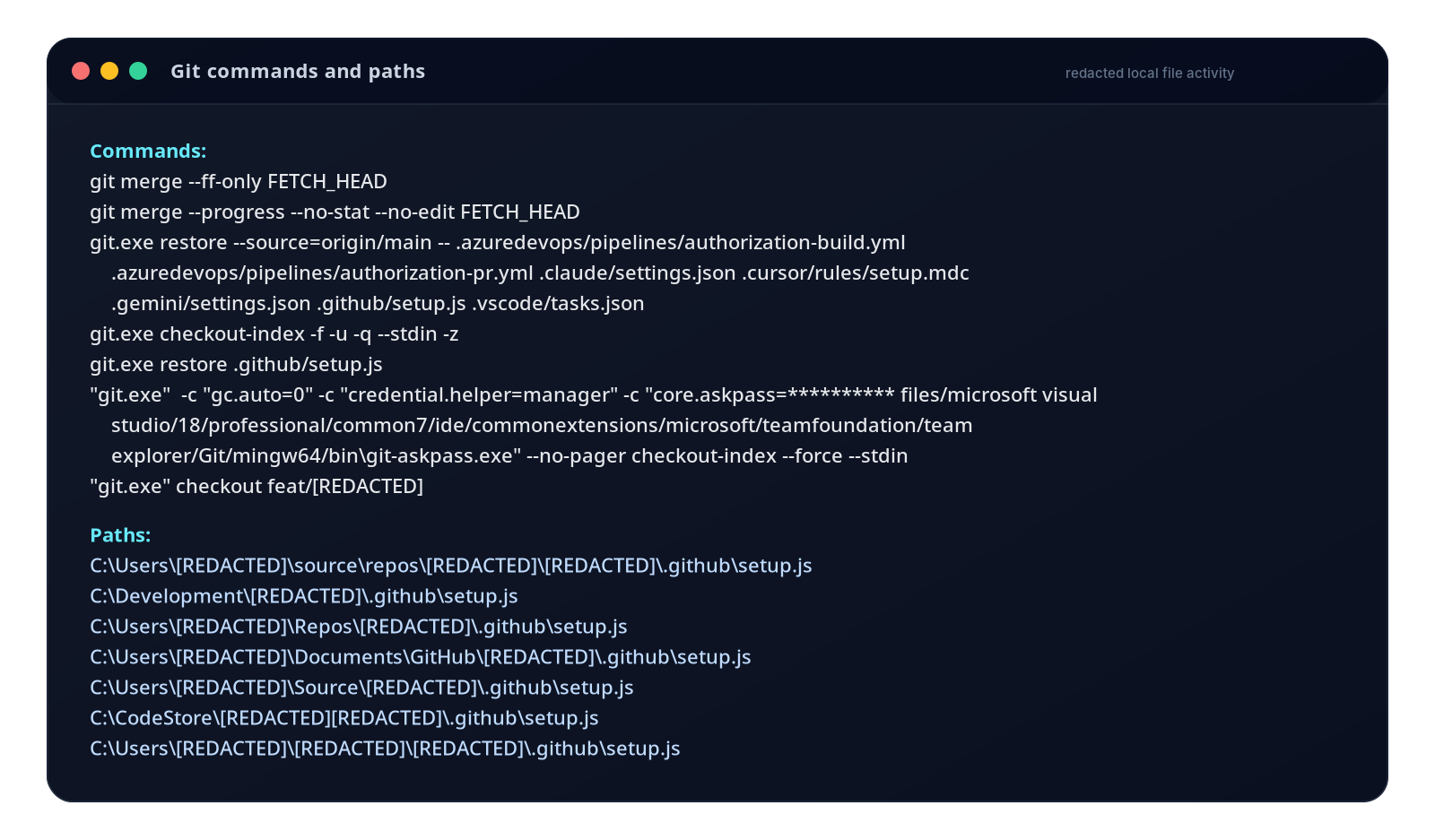
All of these files were read by an AI assistant, or retrieved from a pull request at some point, such as [.claude/settings.json] and [.vscode/tasks.json] seen within a Git restore operation (Figure 1). If these were placed into the repo by a threat actor, they could be modified to execute arbitrary code, enumerate system information, or create shells.
We continued to discover dozens of endpoints running various AI tools and coding assistants, with no consistency of the tool’s vendor or version between endpoints. When we reviewed this activity with the victim, they stated that they would review the policy of approved AI tools and extensions.
While the Deepwatch team did not find any evidence within Defender regarding abuse of the AI tooling or IDE programs, this is an essential finding to report to the victim. The reason being that if the Defender security layer didn’t act quickly, or act at all, the developer workstations were prime targets for the ‘MiniShai’ attack chain.
Investigation Ambiguities: The Fog of War & Remediation Noise
While conducting the investigation into the unauthorized Git activity, Deepwatch had limited visibility due to a lack of available GitHub or CI/CD audit logs. The primary telemetry available was endpoint logging from Defender, which we used to reconstruct the timeline of events. Notably, the victim engaged in aggressive remediation efforts within 12 hours of the initial detection. While fast remediation is usually a great trait to have during an active incident, this could have potentially damaged the assets within the environment, as well as delayed recovery and forensic investigation efforts.
In this case, the early remediation efforts added complexity to Deepwatch’s investigation in two major ways:
- Evidence Contamination: Critical forensic artifacts were altered or obscured by the internal team’s cleanup actions.
- False Positives: Remediation actions that were not documented or disclosed to the Deepwatch response team closely mirrored threat actor activity.
Specifically, the internal team used PowerShell scripts to hunt across the network for Indicators of Compromise (IOCs) related to MiniShai. This generated a massive wave of telemetry showing powershell.exe spawning command-line operations containing the exact strings we were hunting for, such as [bun.exe] or [:duluH-iahS]. While this didn’t stop Deepwatch’s investigation, it created dozens of additional anomalies that had to be manually triaged and classified as “remediation noise” rather than actual threat actor activity.
The Danger of the “Dead Man’s Switch”
Understanding the malware’s intent is critical before taking defensive actions. For MiniShai specifically, this attack chain commonly exhibits having a “dead man switch” which allows the threat actor to monitor the validity of GitHub API tokens.
If ‘setup.js’ had successfully executed on any of the hosts, and the remediation team had revoked an affected user’s token, it is likely that destructive wiping could have occurred on the user’s home directory by executing [rm -rf ~/]. If the user’s home directory is wiped, we can lose numerous artifacts that would highlight the full set of instructions the malware executed. Knowing exactly what happened during execution gives us an idea of what to look for on other hosts during the investigation. It also provides a clear path for the remediation team to undo the exact steps the malware took.
Lessons Learned
It would be easy for anyone to take actions such as resetting passwords and revoking or rotating API tokens, then call it a day. However, this case highlights systemic shifts in the threat landscape that all security teams must adapt to.
- Defense in Depth isn’t going anywhere
The easiest lesson to learn from this is that: security layers work, plain and simple. Had it not been for the endpoint security layer of Defender, the victim would be dealing with significantly worse repercussions.
- Knowledge before action
This is a fairly niche lesson learned, but we would argue it could be applied broadly. In the event of a successful exploitation chain of “MiniShai”, remediation actions taken against the user could’ve damaged the environment more than helping it. To us, this screams “know what you’re working against before taking action.” As an example, you likely wouldn’t open an umbrella at the sound or sight of water. You would assess your environment, determine if the water is coming from the clouds, then open your umbrella because that’s when it is needed. As security teams, you should be taking the same concepts to response and remediation processes. Ensure you know what the attack’s objective is and what the attack is targeting before attempting to take action on an account or host.
- The Attack Surface Has Evolved
With the recent trend of supply chain attacks, it’s important for security teams to recognize dependencies within their environment. These dependencies and essential infrastructure pieces are fair game from the threat actor’s perspective. In the same way a professional bank robber would consider impersonating the USPS delivery service, or utilizing an armored truck to ‘appear legitimate’; Threat actors will take any crumb they can get to complete their goal. In this case, it was the delicious crumbs of developer workstations that utilize npm, and AI assistants within IDEs.
- Least Privilege Applies to the IDE
While developers are essential to operations and often require special privileges or access permissions to complete their operations. This should not limit the security policies applied to their workstations and accounts. In the context of this incident, the ability to modify AI assistant configuration files should be limited to only allow approved and scoped work. These repo-local AI and IDE configuration files should be treated like executable code, which means it should undergo review, ownership, and branch protection. Additionally, the files should also be subject to frequent scanning, with detections built around the artifacts to ensure the proper use of the configuration files.
The least privilege concept doesn’t just stop at the AI tooling, it should apply to the whole development process. During Deepwatch’s investigation we saw workflows accessing GitHub tokens, MCP/Jira contexts, cloud secrets, Docker config, npm tokens, WSL environments, and production cloud tooling. This raises the question of ‘what restrictions or safeguards, if any, are on these developer workstations?’
Conclusion
Thanks to our little Defender engine, the MiniShai activity was contained, and the business impact was minimal. After reviewing the final investigative report with the victim, they even claimed “We were not prepared for this, and this could have been significantly worse if Defender did not take action.” Deepwatch is currently still in contact with the victim and their internal security team, as we await any further information discovered from telemetry that Deepwatch could not review.
While this incident didn’t rely on groundbreaking new malware, it perfectly illustrates how modern threat actors exploit shifting attack surfaces like Git pipelines and shadow AI infrastructure. For defenders, it serves as a timely reminder that our visibility must extend into the very tools our developers use to build the future.
References:
- https://www.deepwatch.com/labs/ca-a-26-005-update-3-mini-shai-hulud-supply-chain-compromise/
- https://www.microsoft.com/en-us/security/blog/2026/05/20/mini-shai-hulud-compromised-antv-npm-packages-enable-ci-cd-credential-theft/
- https://www.stepsecurity.io/blog/mini-shai-hulud-is-back-a-self-spreading-supply-chain-attack-hits-the-npm-ecosystem#persistence-ide-and-os-level-hooks
Observed IOCs:
| SHA256 | File Name |
| d2c0f739359ddfd034902116cb9ddd73884321e4590a3eb2d61fa6ea5fdded41 | setup.js |
Share